How Mem Became My Capture App (I Just Ramble and It Does the Rest)
Okay, so the feature that actually sold me on Mem isn’t a notes feature at all. It’s a button.
The button on the side of my iPhone 17 Pro, to be specific. And the fact that I can press it, talk for ninety seconds like a person thinking out loud, and end up with a clean note is the whole reason this app stuck when a dozen others didn’t.
Heads up: this post has a referral link to Mem. If you sign up through it, I may earn a credit or commission at no extra cost to you — your price is exactly the same. I won’t push an app I don’t actually use, and I use this one every day. That’s the whole deal. The long version of why I do any of this is in Why I Started The Tech JAM.
TL;DR
I’ve had Mem installed on and off for years and never really stuck with it. The last year of AI improvements changed that. Mem is the first capture app I’ve actually kept, and it stuck because of voice, not folders or tags or any of the usual stuff. I’m on the free tier, it’s been enough for how I use it, and the day it isn’t, I’ll pay for Pro without thinking twice. My rating: 3.5 / 5 as a full notes app, 4.5 / 5 for the capture-and-cleanup flow I actually keep it around for. Here’s the honest version.
I keep failing at notetaking apps
Here’s the embarrassing part. I’ve started over in a notes app more times than I can count.
Apple Notes, a couple of years of half-hearted folders. A Notion setup I built on a Sunday and abandoned by Wednesday. Voice memos that piled up and never got listened to again. Random thoughts typed into whatever app was already open. The problem was never the app, honestly. The problem was me, and the friction of capture.
By the time I’d unlocked my phone, found the right app, decided which folder a thought belonged in, and started typing, the thought was either gone or it felt too small to bother writing down. So I didn’t. And the notes app stayed empty enough that I stopped trusting it, which made me use it even less. You know how that goes.
What I needed wasn’t a better place to put notes. It was a way to capture a thought before my brain moved on. That’s the thing Mem actually solved.
And here’s the honest twist: Mem isn’t new to me. I’ve had it installed on and off for something like three or four years. For most of that stretch it was just another app I’d opened with good intentions and quietly stopped using, same as all the others. It’s the last year or so of AI improvements that flipped it from “abandoned again” into the one that stuck. Same app, different app.
The button on the side of my phone
The iPhone 17 Pro has an Action Button (that little programmable button above the volume keys), and you can point it at almost anything. Camera, flashlight, a Shortcut, whatever you want. Mine runs a Shortcut that drops straight into voice mode in the Mem iOS app.
So now the entire process of taking a note is this: long-press the button, talk, done. I don’t unlock the phone. I don’t open an app and stare at a blank note deciding what to call it. I press a button that’s always in the same spot and I start talking.
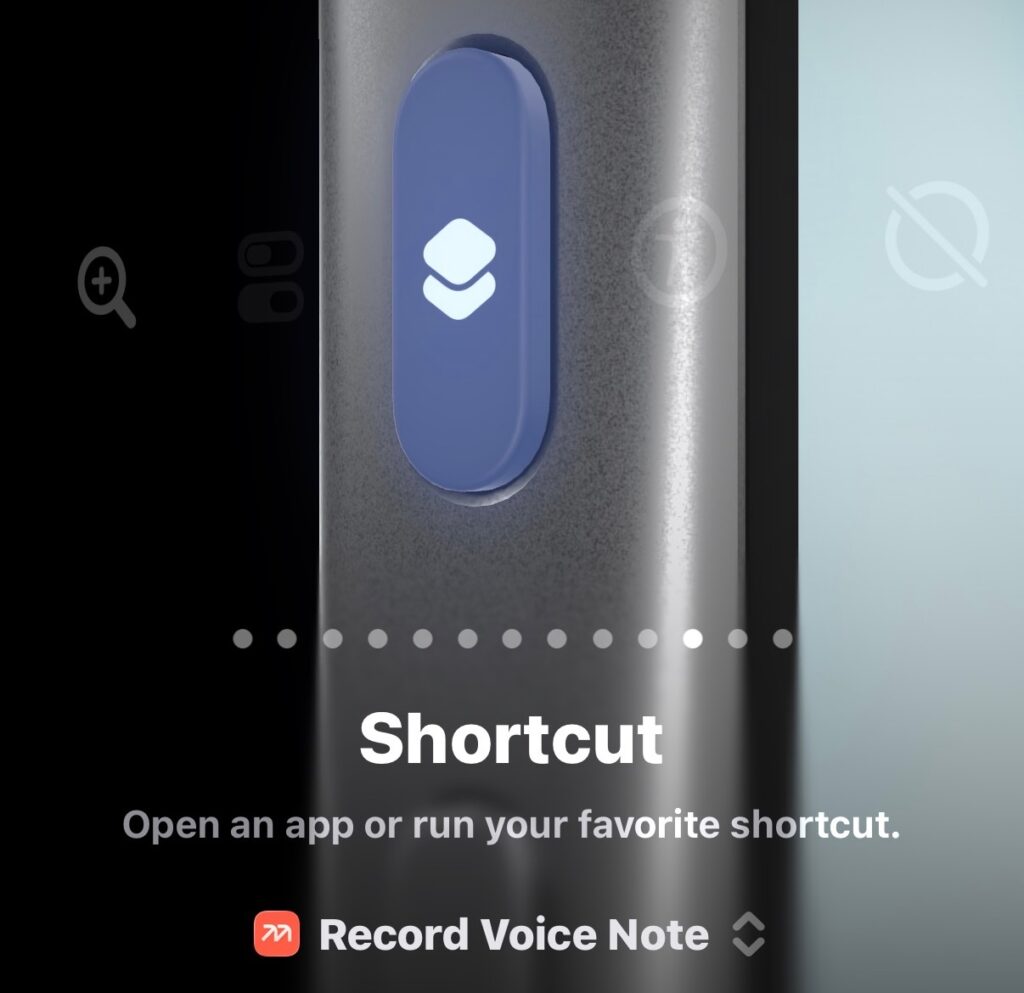
My iPhone 17 Pro Action Button, set to a “Record Voice Note” Shortcut.
That sounds like a small thing. It is a small thing. But it’s the small thing that fixed the whole problem, because the friction is what was killing me, and the button took the friction down to basically zero. A thought shows up while I’m walking the dog or loading the dishwasher or sitting in the car before I’ve started it, and I just… say it. Mem catches it. Once a week I sweep those captures into Obsidian, which is my actual second brain — Mem is where a thought lands, not where it lives. But that sweep is a whole different post.
I’ve had the Action Button do flashlight, camera duty and several other app functions in the past and it was fine. This is the first time I’ve given it a job that genuinely changed a habit. If you’ve got a phone with a programmable button and you’ve been wondering what to do with it, this is my pitch: give it to whatever lowers the friction on a thing you keep failing to do.
What “just rambling” actually turns into
This is the part that still kind of surprises me.
When I do a voice capture, I don’t script it. I ramble. I stop, restart, say “uhh” a lot, contradict myself halfway through, circle back. It’s a genuine mess, the way anybody actually talks when they’re thinking instead of presenting.
And then Mem hands me back a clean note. The uhhs are gone. The false starts are gone. The “wait, no, what I meant was” is gone. What’s left is a tidy little summary of the point I was actually making, structured into something I’d be happy to read a month later. It even keeps the original audio and the raw transcript attached underneath, so if the cleaned-up version missed a nuance, the source is right there.
Before: the raw recording and transcript, captured exactly as I rambled it.
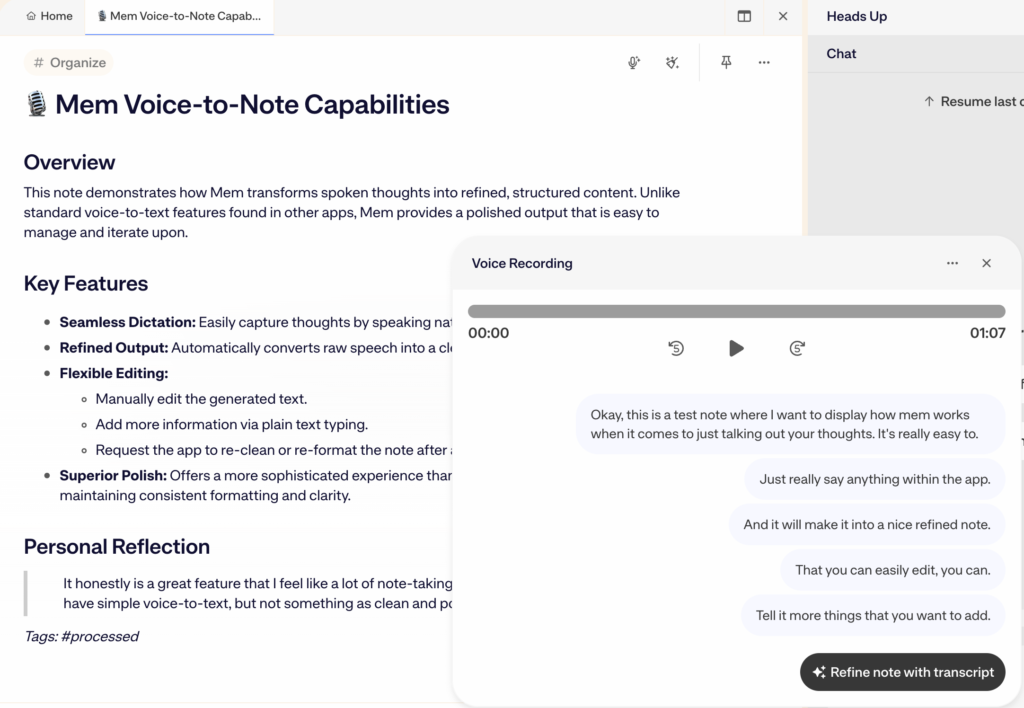
After: the same capture, cleaned into a structured note I’d actually re-read.
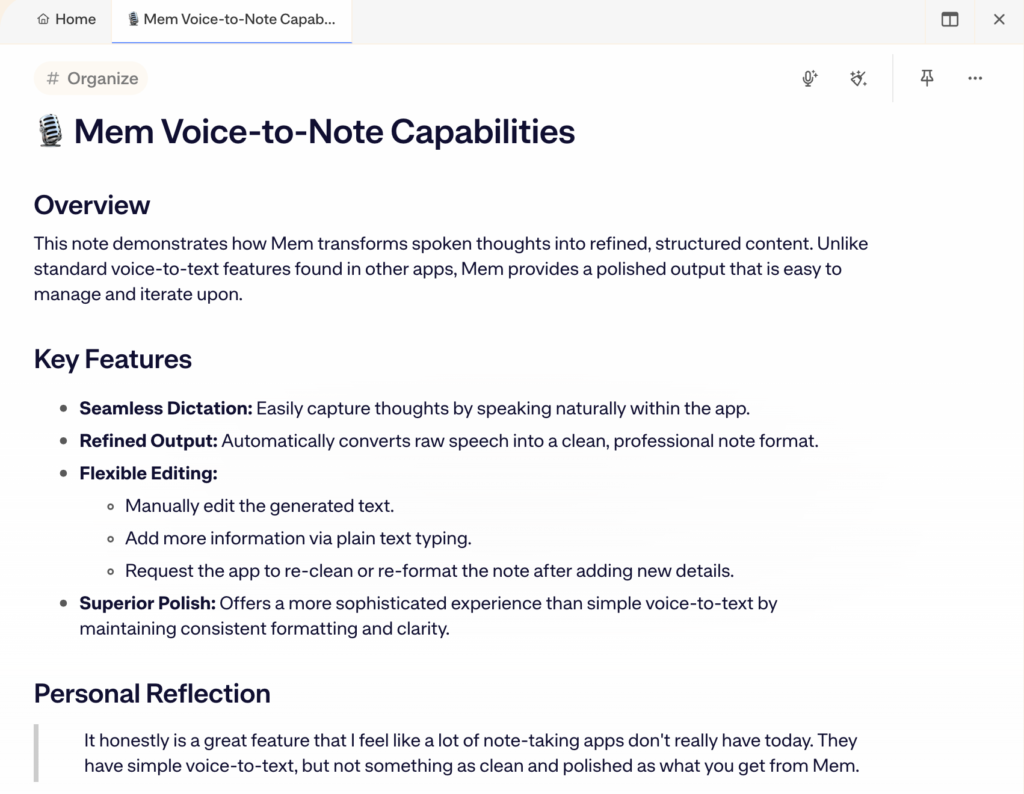
I want to be clear about what this is and isn’t. It’s not magic, and it’s not always perfect (more on that below). But the gap between “a 90-second voice memo I will never relisten to” and “a clean note I’ll actually use” is enormous, and Mem closes most of it automatically. That’s the trade. I give it a mess, it gives me back something useful, and I didn’t have to sit there editing.
For me, that’s been clutch. Capturing the thought was always the hard part. Cleaning it up was always the part I skipped. Mem took the part I skipped and just did it.
And when the clean version isn’t quite right, there’s a Refine feature I’ve come to lean on. I type a quick instruction in plain English, something like “tighten the second half” or “fix the spelling of that name,” and Mem figures out where in the note that change belongs and makes it there. I don’t have to point at the line myself. It also doesn’t just apply edits behind your back. Every action comes with a clear Reject, Refine, and Accept, so I see exactly what it wants to do before anything sticks. If the edit isn’t right, I refine the instruction or reject it outright. That little bit of control is the difference between trusting the AI and babysitting it.
The AI chat does about 80% of what I want
Mem also has a built-in AI chat that talks to your whole pile of notes, and I’ll be straight with you: it’s good, not incredible. It gets about 80% of the job done, and I’ve made my peace with that 80%.
What it’s genuinely useful for is finding things. I’ll ask it something like “what did I say about that podcast idea a few weeks back” and it surfaces the note without me remembering a single keyword I used. It also does a decent job relating notes to each other, pointing out that this thought connects to that one, and it can summarize a cluster of notes into something coherent when I’ve rambled about the same topic five separate times.
So as a way to search, organize, and pull threads together across everything I’ve dumped in, it works. That’s the 80%. The other 20% is where it gets a little shallow. Ask it to do real reasoning or draft something substantial off your notes and it’s more “fine” than “wow.” I don’t lean on it for that. I lean on it to find and connect, and for that it earns its keep.
Honestly, if the chat were the only feature, I probably wouldn’t be writing this post. It’s the voice capture carrying the app. The chat is a useful bonus that makes the captured notes worth more than they’d be just sitting there.
The honest caveats
A few things I want to be straight about, because a review with no caveats isn’t a review.
I’m on the free tier, and the free tier has limits. Mem caps free accounts at 25 new notes, 25 chat messages, and 25 PDF pages a month, and Pro (currently $12/month) lifts all of that. I haven’t hit the ceiling yet for how I use it (I’m a capture-a-few-thoughts-a-day person, not a capture-fifty person), so the free tier has genuinely been enough. But I’m not going to pretend it’s unlimited. If I scaled up how much I throw at it, I’d hit that wall. And if I did, I’d pay for Pro without hesitating, because the app would have already proven it’s worth it. Twelve bucks for the one tool that finally fixed my notetaking habit is an easy call. I just haven’t had to make it yet.
The voice cleanup mishears things. Not often, but it happens: a name, a piece of jargon, a word I mumbled. This is why keeping the original audio and transcript attached matters so much. When something looks off in the clean version, I check the source. Treat the AI summary as a draft of your thought, not gospel.
The AI chat, like I said, is the 80% tool. If you’re expecting a research assistant that reasons deeply across your notes, you’ll be a little let down. It finds and connects well. It doesn’t think for you.
And the bigger-picture honesty: Mem is an AI-first, cloud app. The notes you put in it live on their servers, and the whole value proposition runs through their AI. For me that’s fine, because what I capture in Mem doesn’t stay in Mem — it gets swept into Obsidian, which is local, plain-text, and mine. But if you want the capture layer itself to be local, with no cloud and no AI in the loop, Mem isn’t built for that. I use it for fast, messy capture of thoughts and ideas, and I went in knowing exactly what kind of tool it is.
Who I’d actually recommend Mem for
If you’re me — someone who thinks out loud, has ideas at inconvenient times, and has quietly failed at five notes apps because typing a thought into a folder is too much friction in the moment — Mem is worth a real try. The voice capture is the unlock. Map it to a button or a shortcut you can hit without looking, and see if the habit finally sticks. For me it did.
If you’ve already got a notetaking system that works and you actually use it, you probably don’t need this. Don’t fix what isn’t broken. The people Mem helps are the ones who keep bouncing off their notes app, not the ones who’ve already made one stick.
And if you specifically want to own your files, work offline, and never depend on someone’s AI or someone’s servers, Mem’s whole design points the other way. That’s not a flaw, it’s just a fit question. Be honest with yourself about which kind of person you are before you commit a few months of notes to it.
The free tier costs nothing, so the bar to just trying it is about as low as it gets.
Verdict (Note Taking App vs. Capture App)
So here’s my rating, and it’s really two ratings, because Mem is two things to me.
As a full notes app, the place every note you take is supposed to live for good, I’d give Mem a 3.5 / 5. The AI chat is an 80% tool, solid for finding and connecting notes but not for the real thinking. It’s a cloud, AI-first app, and your notes live on their servers, not on your machine, so if owning your files offline matters to you, that’s a genuine strike against it. The voice cleanup still mishears a name or a mumbled word now and then. And the free tier has a ceiling I’d eventually run into if Mem were the only place I captured anything. None of that sinks the app for me, but if I were asking it to be my one and only notes system, it would weigh.
For the job I actually give it, though, it’s a 4.5 / 5. Press the button, ramble, get back a clean note. The capture flow and the AI cleanup are the part that fixed a problem I’d been failing at for years, and that part clears by a mile. That’s the Mem I’m a fan of, and it’s the reason the app stuck when a dozen others didn’t.
After years of failing at this, I’ve finally got a capture habit that sticks, and the reason is embarrassingly simple: Mem let me stop typing and start talking, and then it cleaned up the mess for me. If you’ve got a thought right now that you’re not going to write down because writing it down is too much effort… that’s exactly the problem this fixed for me.
Give the Action Button a job. Mine’s been a good one.
— J.A.M.